Feb 17, 2008

Meet Charlie - what is Enterprise2.0?


Meet Charlie - what is Enterprise2.0?


From: slgavin, 9 months ago


A visual and entertaining example of web2.0 within the corporation.

Visually inspired by the brilliant Meet Henry by Cheree Moore of Ethos3 Communications! Check it out: http://www.slideshare.net/chereemoore/meet-henry


SlideShare Link

Feb 16, 2008

RSS for Global CyberSoft


Hey, have you heard about Yahoo! Pipes?


From: http://pipes.yahoo.com


About Pipes

Pipes is a powerful composition tool to aggregate, manipulate, and mashup content from around the web.


Like Unix pipes, simple commands can be combined together to create output that meets your needs. Here are a few popular ways the service can be used:


To learn more about Pipes, and how you can use it, visit the Pipes Documentation.


Sound great?


Finally I have tried to build up a pipe for Global CyberSoft, it's very cool and easy, in just a minute you can have your own feeds


Try it here: http://pipes.yahoo.com/pipes/pipe.info?_id=a7d8303c036a025a1a6a447ffebb3f39


Enterprise 2.0: Five Innovations the CIO Shouldn’t Miss

Everyone in the organization will benefit from innovation, even CIOs. Technology managers can't afford to ignore Web 2.0 collaboration technologies, such as blogs, social networking, Microsoft Office SharePoint Server 2007 and converged communications. Take a look at five innovations that you should not miss even when you are in upper management such as:

- "Blogs Away" with new communication techniques – more CXOs are taking advantage of this important Web 2.0 innovation.
- Social Networking – It's not just for kids! – At the core are software from Google (like AJAZ and Google Mashup Editor) and Microsoft products (like Popfly and Silverlight).
- Unified communications – Microsoft Office Communication Server and Cisco's Unified IP phones are leading the charge.
- A rolling MOSS gathers no stones- MOSS can be views as either a challenge to manage for IT shops or an important innovation catalyst for business processes.
- AAA: Anytime, Anywhere, Anybody – there is no place to hide, unless you press the Off button.

Read the entire article by Jack Santos on CIO here.

Feb 14, 2008

Create a Dashboard in iPhone

You have seen the dashboard in iPhone UI or in Mac OS X UI. The following code snippet shows you how to create a dashboard in iPhone native application.


The code is Object C format


- (UIButtonBar *)createButtonBar

{

UIButtonBar *myButtonBar;

myButtonBar = [[UIButtonBar alloc]

initInView: self

withFrame: CGRectMake(10.0f, 380.0f, 300.0f, 100.0f)

withItemList: [self buttonBarItemList]];


[myButtonBar setDelegate: self];

// This set the style of the bar

[myButtonBar setBarStyle: 3];

// This set the tracking mode (effect when clicking on the button of the bar)

[myButtonBar setButtonBarTrackingMode: 1];


int buttons[3] = { 1, 2, 3 };

[myButtonBar registerButtonGroup: 0 withButtons: buttons withCount: 3];

[myButtonBar showButtonGroup: 0 withDuration: 0.0];


/* This set the layout of the button */

int tag;

for (tag = 1; tag < 4; tag++)

{

[[myButtonBar viewWithTag: tag]

setFrame: CGRectMake(10.0f + ((tag-1)*(80.0 + 10.0)), 1.0f, 100.0f, 80.0f)

];

}


return myButtonBar;

}


The item list of the button bar


- (NSArray *)buttonBarItemList

{

return [NSArray arrayWithObjects:

[NSDictionary dictionaryWithObjectsAndKeys:

@"buttonBarClicked:", kUIButtonBarButtonAction,

@"button_back.png", kUIButtonBarButtonInfo,

@"button_back_pressed.png", kUIButtonBarButtonSelectedInfo,

[NSNumber numberWithInt: 1], kUIButtonBarButtonTag,

self, kUIButtonBarButtonTarget,

@"Page 1", kUIButtonBarButtonType,

@"0", kUIButtonBarButtonType,

nil

],

[NSDictionary dictionaryWithObjectsAndKeys:

@"buttonBarClicked:", kUIButtonBarButtonAction,

@"button_open.png", kUIButtonBarButtonInfo,

@"button_open_pressed.png", kUIButtonBarButtonSelectedInfo,

[NSNumber numberWithInt: 2], kUIButtonBarButtonTag,

self, kUIButtonBarButtonTarget,

@"Page 2", kUIButtonBarButtonType,

@"0", kUIButtonBarButtonType,

nil

],

[NSDictionary dictionaryWithObjectsAndKeys:

@"buttonBarClicked:", kUIButtonBarButtonAction,

@"button_next.png", kUIButtonBarButtonInfo,

@"button_next_pressed.png", kUIButtonBarButtonSelectedInfo,

[NSNumber numberWithInt: 3], kUIButtonBarButtonTag,

self, kUIButtonBarButtonTarget,

@"Page 3", kUIButtonBarButtonType,

@"0", kUIButtonBarButtonType,

nil

],

nil];

}


The click message, which will handle the click event of the button bar


- (void)buttonBarClicked: (id) sender

{

}


And you will got a nice UI like this
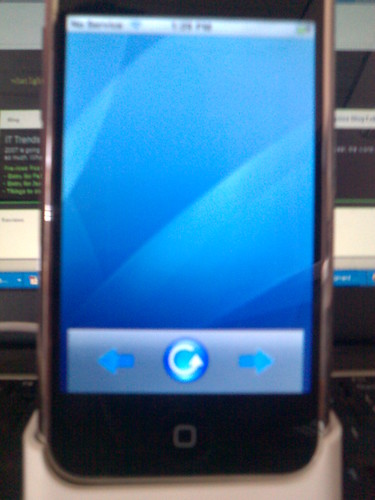


That's all, Have fun with iPhone & Object C coding

Feb 13, 2008

Configure Wireless Network for Linksys WMP54GS on Mac OS X 10.4.6 (x86)

The following topic shows you how to configure wireless network for Mac OS X 10.4.6 (x86) using Linksys WMP54GS

Open this file in console or in finder

/System/Library/Extensions/IO80211Family.kext/Contents/PlugIns/AppleAirPortBrcm4311.kext/Contents/Info.plist

Then you should find this in the file Info.plist

pci14e4,4311
pci14e4,4312
pci14e4,4320
pci14e4,4324

At the end of this just add this:

pci14e4,XXXX

Where XXXX is your device ID.

To get your device ID, log into your Windows system

Control Panel \ System \ Hardware \ Device Manager \ Network Adapters \Right Click on properties \ Details then you will see
PCI\\VEN_XXXX&DEV_YYYY&..................

Use XXXX as your vendor ID, and YYYY as Device Id.

Reboot and have a nice hacking Mac OS X

Jan 11, 2008

Technology on the show

If you are working in IT environment, if you are working on technology, you should focus into following techs

1. Microsoft
  • IIS 7.0
  • .NET 3.0 & 3.5: WCF, WF, WPF
  • LINQ
  • SharePoint
  • Virtualization
  • Unified Communication
  • Office System
2. Linux
  • Inter-operative
  • Virtualization
  • Open Document Format
  • Samba
  • Security
3. Other
  • Java EE 5
  • RIA
  • Web 2.0
  • Web Services
  • High Performance Computing
  • Parallel Computing

Anything else? Fix me, please

PingBack from http://blog.360.yahoo.com/blog-s.PxqwsobqqISFGn3IYhK1RX?p=839

Jan 1, 2008

Happy New Year (2008)

Happy New Year to my friends :-)
Things to do in the holiday
  1. Study SharePoint
  2. Study Visual Studio 2008
  3. Study SQL Server 2008
  4. Investigate Continuous Integration
  5. Investigate Collaborative Development Environment
That's all. Have a successful year, my friends.

PingBack from http://blog.360.yahoo.com/blog-s.PxqwsobqqISFGn3IYhK1RX?p=818